
Subaru Outback (BR): Floor mat
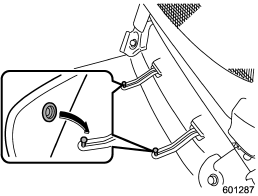
Retaining pins are located on the driver’s side floor.
The floor mat is secured using the built-in grommets, by placing the grommets over the pins and pushing them downward.
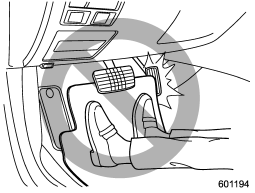
CAUTION
Make sure the driver’s floor mat is placed back in its proper location and correctly secured on its retaining pin. Also, do not use more than one floor mat. If the floor mat slips forward and interferes with the movement of the pedals during driving, it could cause an accident.
READ NEXT:
 Cargo area cover (if equipped)
The cargo area cover is provided for covering the cargo area and to protect its
contents from direct sunlight. This cover is detachable to make room for additional
cargo.
Using the cover
To extend the cover, pull the end of the cover out of the housing, then insert
its hooks into the catches as shown. To rewind it, unhook it from the catches and
it will rewind automatically. You
To remove the cover housing
1. Rewind the cover.
2. Hold down the button on the righthand rear quarter panel and lift up the right-hand
cover housing.
3. Remove the cover housing.
SEE MORE:
Dome light remove bulb
1. Remove the lens by prying the edge of the lens with a flat-head screwdriver.
2. Turn the bulb until the flat surfaces at its ends are aligned vertically.
3. Pull the bulb straight downward to remove it.
4. Install a new bulb.
5. Reinstall the lens.
AT Shift Lock Control System
A: LOCATION
TCM ("P" range)
Body integrated unit
Stop light switch
Key cylinder (with built-in key
warning switch)
Solenoid unit
"P" range switch
Key lock solenoid
B: ELECTRICAL SPECIFICATION
*1: Measuring condition
Output signal for key lock solenoid (unlock)
Output signal for key l
© 2010-2026 Copyright www.suoutback.com
