
Subaru Outback (BR): Center console box (front)
Subaru Outback (BR) 2010-2015 Owners Manual / Interior equipment / Storage compartment / Center console box / Center console box (front)
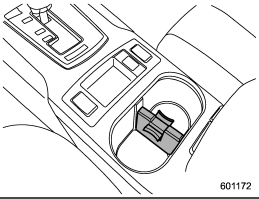
If you remove the divider plate from the dual cup holders, you can use the center console box as a storage space.
To use as storage space:
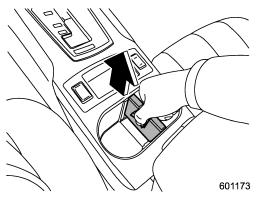
Pull out the divider plate of the dual cup holder.
To use again as cup holders:
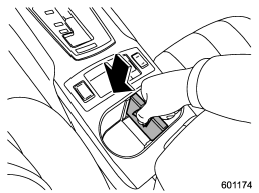
Insert the divider plate into the console box.
READ NEXT:
 Center console box (rear)
The center console box has a two-layer structure consisting of an upper compartment
and a lower compartment.
Upper compartment
1) Upper compartment lock release Pull up the upper compartment l
Overhead console
To open the console, push on the lid lightly and it will automatically open.
CAUTION
When your vehicle is parked in the sun or on a warm day, the inside of the overhead
console heats up. Avoid s
Pocket (if equipped)
CAUTION
Do not use the pocket as an ashtray or leave a lighted cigarette in the pocket.
This could cause a fire.
To use the pocket, open the lid.
SEE MORE:
Manual transmission
WARNING
● Do not drive the vehicle with the clutch disengaged (i.e., when the clutch
pedal is depressed) or with the shift lever in the neutral position. Engine braking
has no effect in either of these conditions and the risk of an accident is consequently
increased.
● Do not eng
Tire Identification Number (TIN)
Tire Identification Number (TIN) is marked on the intended outboard sidewall.
The TIN is composed of four groups. Here is a brief review of the TIN with a breakdown
of its individual elements.
(1) Manufacturer’s Identification Mark
(2) Tire Size
(3) Tire Type Code
(4) Date of Manufacture
© 2010-2026 Copyright www.suoutback.com
