
Subaru Outback (BR): Operating the passengers’ windows
Subaru Outback (BR) 2010-2015 Owners Manual / Keys and doors / Windows / Power window operation by driver / Operating the passengers’ windows
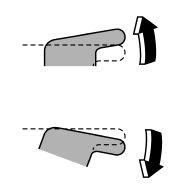
To open:
Press the appropriate switch down and hold it until the window reaches the desired position.
To close:
Pull the switch up and hold it until the window reaches the desired position.
READ NEXT:
 Locking the passengers’ windows
1) Lock
2) Unlock
To lock:
Press the lock switch. When the lock switch is in the lock position, the passengers’
windows cannot be opened or closed.
To unlock:
Press the lock switch again.
Passenger’s side power window switches
Each passenger window can be controlled by the power window switch located on
the door.
SEE MORE:
Charge warning light
If this light illuminates when the engine is running, it may indicate that the
charging system is not working properly.
If the light illuminates while driving or does not turn off after the engine
starts, stop the engine at the first safe opportunity and check the alternator belt.
If the be
Remote start safety features
For safety and security reasons, the system will fail to start and honk the horn
twice or shut down the engine during remote start operation if any of the following
occur:
● Any of the doors or the trunk / rear gate are open / opened (*the vehicle’s
horn will honk six times and the si
© 2010-2026 Copyright www.suoutback.com
