
Subaru Outback (BR): Power switch and volume control
Subaru Outback (BR) 2010-2015 Owners Manual / Audio / Power and sound controls / Power switch and volume control
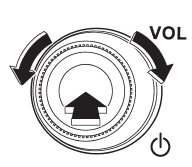
The dial is used for both power (ON/OFF) and volume control. The radio is turned ON and OFF by pressing the dial, and the volume is controlled by turning the dial.
READ NEXT:
 Tone and balance control
Each brief press of the “TUNE/TRACK/ CH” dial changes the control modes in the
following sequence.
Choose the desired level for each mode by turning the “TUNE/TRACK/CH” dial. The
cont
Other sound setting controls (type A audio)
Each brief press of the “MENU” button changes the control modes in the following
sequence.
Choose the desired settings for each mode by turning the “TUNE/TRACK/CH” dial.
The control fu
SEE MORE:
Coat hook
WARNING
Do not hang coat hangers or other hard or pointed objects on the coat hooks.
If such items were hanging on the coat hooks during deployment of the SRS curtain
airbags, they could cause serious injuries by coming off the coat hooks and being
thrown through the cabin or by preventing
Keyless Entry Control Module
A: REMOVAL
1. SEDAN MODEL
1) Disconnect the ground cable from battery.
2) Remove the rear shelf trim. <Ref. to EI-120, REMOVAL, Rear Shelf Trim.>
3) Remove the keyless entry control module.
Disconnect the connector.
Remove the bolt and remove the keyless entry control module.
2. OUTBACK
© 2010-2026 Copyright www.suoutback.com
